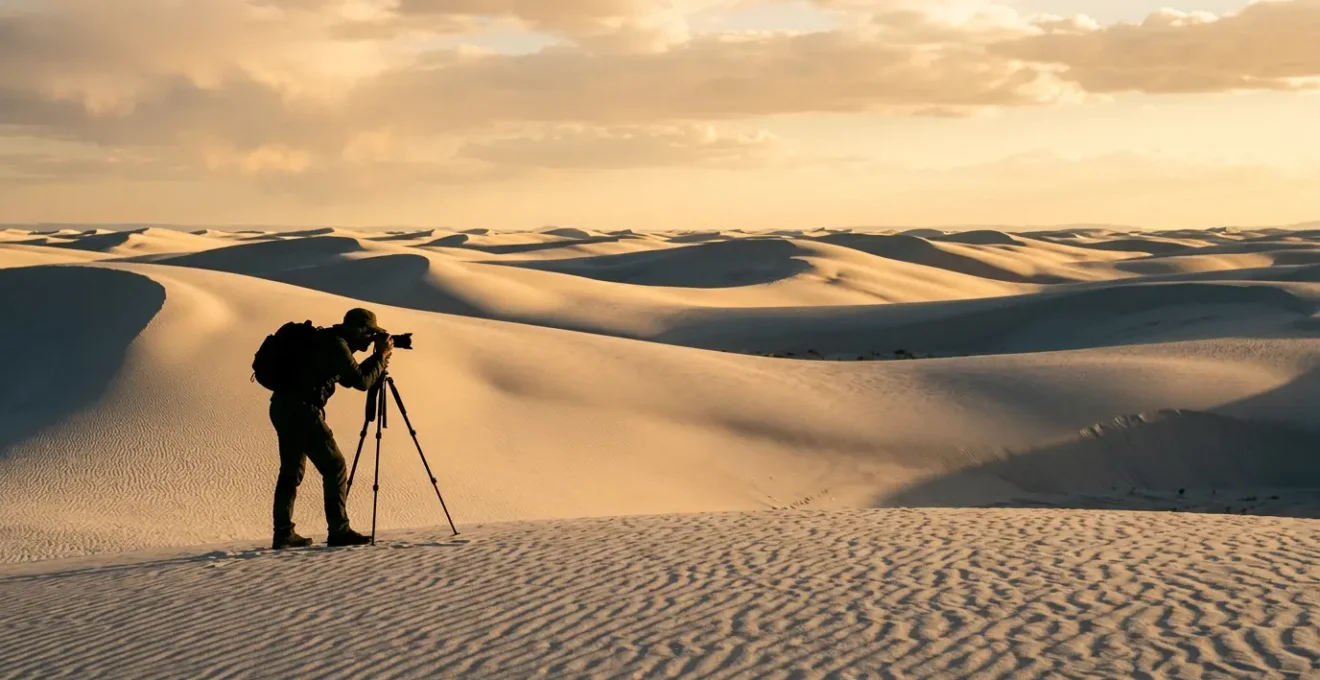
The secret to professional-grade white sand photos isn’t just tweaking exposure; it’s adopting a systematic methodology that anticipates how light and sand interact.
- Understand the physics: White gypsum sand has a high albedo that tricks your camera’s meter, requiring a deliberate +1 to +1.5 stop exposure compensation.
- Protect systematically: Microscopic salt and sand particles are a bigger threat than dropping your camera. Never change lenses on the beach.
- Edit for authenticity: Use targeted luminance masking and vibrance adjustments (not saturation) to restore detail and color without creating an artificial look.
Recommendation: Shift your mindset from taking snapshots to executing a planned shoot. Master these technical and strategic principles to consistently capture the stunning reality of white sand landscapes.
That pristine stretch of white sand, so brilliant it hurts your eyes, becomes a washed-out, greyish blob in your photos. It’s a common frustration for amateur photographers. The immediate advice is always the same: “watch your exposure,” “use a filter,” or “shoot at golden hour.” While these tips have merit, they are merely single notes in a complex symphony. They treat the symptom—overexposure—without addressing the root cause: a fundamental misunderstanding of how to approach these uniquely challenging environments.
Photographing brilliant white sand isn’t about finding a magic camera setting. It’s about adopting a professional methodology. This involves understanding the unique physics of light reflecting off gypsum or coral sand, implementing a strict protocol for gear protection against invisible threats, and executing a disciplined editing workflow. The difference between a bland snapshot and a breathtaking landscape shot lies not in the gear, but in the system. Forget chasing random tips; it’s time to learn the cohesive strategy that turns amateurs into reliable capturers of coastal beauty.
This guide will deconstruct that professional methodology. We will explore the science behind why some sands stay cool and how that impacts your camera’s meter. We’ll break down the critical mistakes that destroy gear, detail the nuances of golden hour light on the coast, and provide a step-by-step workflow for editing your images to look vibrant yet authentic. Finally, we’ll zoom out to cover the logistics of planning a multi-environment shoot and scouting the perfect, secluded locations.
Summary: Mastering White Sand Photography: A Pro’s Methodology
- Why Does the Sand in the East Stay Cool Even at Noon?
- Saona Island or Eagle Bay: Which Location Has the Whitest Sand for Photos?
- The Sand Mistake That Ruins Cameras and Drones in Minutes
- When Is the ‘Golden Hour’ Most Vibrant on the East Coast?
- How to Edit Beach Photos to Look Vibrant Yet Authentic?
- How to Build a Photography Itinerary Covering Coast, Mountain, and Desert?
- Where to Find Crystal Clear Water Safe for Children and Beginners?
- Where to Find Private Beach Access That Actually Lives Up to the Photos?
Why Does the Sand in the East Stay Cool Even at Noon?
The first step in our methodology is understanding your subject. Not all white sand is created equal, and its physical properties directly influence your photographic technique. The “coolness” of certain white sands, like those at White Sands National Park, is due to their composition. They are made of gypsum, not the typical quartz. Gypsum doesn’t absorb the sun’s heat, allowing you to walk on it barefoot even at midday. Photographically, this is due to its extremely high albedo effect—its ability to reflect, rather than absorb, solar radiation.
This high reflectivity is the primary reason your camera struggles. Your camera’s light meter is programmed to see the world as “middle grey” (18% grey). When faced with a vast, bright white landscape, it gets confused. It thinks the scene is overexposed and tries to “correct” it by darkening the image, turning your brilliant white sand into a dull, muddy grey. Research shows that gypsum sand maintains temperatures up to 38°C (100°F) cooler than silica sand precisely because of this reflectivity. To counteract this, you must take manual control and apply a metering discipline.
The professional approach is to intentionally overexpose relative to what the camera suggests. Set your camera to manual or aperture priority and dial in +1 to +1.5 stops of exposure compensation. This tells the camera, “I know the scene is bright; trust me and keep it bright.” Use your histogram to ensure you aren’t “clipping” the highlights (pushing the data all the way to the right edge of the graph), but don’t be afraid to have the data “kiss” the right side. This technique preserves the brilliant white of the sand without losing all detail to overexposure.
Saona Island or Eagle Bay: Which Location Has the Whitest Sand for Photos?
Understanding the science of sand allows you to make informed decisions when scouting locations. The “whitest” sand isn’t always the best for photography; its texture, surrounding elements, and orientation to the sun are just as crucial. Comparing two famous locations like Saona Island and Eagle Bay reveals how different types of white sand demand different photographic approaches.
Saona Island’s sand is coral-based aragonite, extremely fine and highly reflective, similar to our gypsum example. This requires the exposure compensation techniques we’ve discussed. In contrast, Eagle Bay’s sand is quartz-based, with coarser grains and shell fragments. This texture provides more mid-tones for your camera’s meter to lock onto, making exposure slightly easier. The compositional elements also differ. Saona offers classic tropical scenes with leaning palms, while Eagle Bay presents dramatic rock formations. This dictates your lens choice: a wide-angle for Saona’s expansive views, and a telephoto for compressing the layers at Eagle Bay.
This comparative table from a guide on beach photography tips breaks down the key differences for a photographer:
| Feature | Saona Island | Eagle Bay |
|---|---|---|
| Sand Type | Coral-based aragonite | Quartz with shell fragments |
| Best Shooting Time | Sunrise (east-facing) | Sunset (west-facing) |
| Compositional Elements | Leaning palm trees, turquoise water | Rock formations, tidal patterns |
| Exposure Challenge | High reflectivity requires +1.5 EV | Mixed textures allow standard metering |
| Recommended Focal Length | Wide angle (24-35mm) | Telephoto (70-200mm) for compression |
The key takeaway for the professional is that location choice is a strategic decision. You don’t just go to a “white sand beach”; you choose a location whose sand type, compositional elements, and orientation to the sun best match the image you want to create.
The Sand Mistake That Ruins Cameras and Drones in Minutes
A core part of the professional methodology is obsessive gear protection. The beach is one of the most hostile environments for delicate electronics, not because of the obvious threat of water, but because of the insidious danger of systematic contamination by microscopic sand and salt crystals. As the USGS Coastal Monitoring Team warns in its reports:
The biggest mistake isn’t dropping the camera, but changing lenses on the beach. Airborne microscopic sand and salt crystals are drawn onto the camera’s sensor by static electricity, causing permanent damage.
– USGS Coastal Monitoring Team, Remote Sensing Coastal Change Report 2024
This single mistake can cause permanent scratches on your sensor or leave specks that will appear in every photo thereafter. The rule is simple: choose your lens before you get on the sand and do not change it. If you absolutely must, you must create a “clean room” by placing your camera and new lens inside a large, clear plastic bag to perform the swap, or retreat to the shelter of your car.
Drones face even greater risks. The fine sand particles can infiltrate motors, causing them to seize, and interfere with gimbal stabilization. A 2024 study on coastal monitoring with UAVs provided a crucial data point: the optimal shooting altitude was found to be exactly 1 meter. Any lower, and sand kick-up interfered with focus; any higher, and the image lost texture. This illustrates a professional’s attention to detail, turning a general tip (“be careful with your drone”) into a specific, actionable parameter.
Your Action Plan: Beach Photographer’s Equipment Protection Protocol
- Choose your lens before stepping onto the beach and commit to it. Never change lenses in the open air.
- Prepare an “emergency clean room” (a large Ziploc bag) in your kit for absolute necessity lens changes, performed away from the wind.
- Pack a rocket blower to remove loose sand from camera bodies. Never use canned air, which can force particles deeper into the camera.
- Always position your back to the wind when accessing your camera bag or making adjustments to shield your gear with your body.
- For drones, launch from a dedicated landing pad, not directly from the sand, and perform compass calibration away from the beach to avoid magnetic interference from iron in the sand.
When Is the ‘Golden Hour’ Most Vibrant on the East Coast?
Every photographer knows the “golden hour”—the period shortly after sunrise or before sunset—offers the best light. But the professional methodology demands a deeper understanding. It’s not just about *when* the golden hour is, but *how* the light behaves during that window and how it differs between morning and evening, especially on an east-facing coast.
On an east coast, the morning golden hour provides direct, dramatic, warm light. The sun rises over the water, creating opportunities for stunning silhouettes, long shadows from dunes, and a golden sheen on the water’s surface. This is the ideal time for classic landscape shots. The evening, however, offers a completely different palette. The sun sets behind you, over the land, bathing the beach in soft, indirect, pastel-colored light. This light is incredibly flattering for portraits, as it lacks the harshness of direct sun. The real magic, however, often happens *after* the sun has dipped below the horizon. This is the “blue hour,” where the sky can fill with intense purples and blues. A specific phenomenon to watch for is the “Belt of Venus,” a stunning pinkish-blue band that appears in the sky opposite the setting sun, typically 20-30 minutes after sunset.
Timing is everything. While the golden “hour” lasts about 60 minutes, the most intense, vibrant colors are often fleeting. According to professional beach photographers, the most vibrant golden hour colors occur 15-20 minutes before sunset, though you should start shooting 30-45 minutes beforehand to be in position. This short window is when the sun is at its lowest, and its light is being filtered through the most atmosphere, creating the warmest tones.
How to Edit Beach Photos to Look Vibrant Yet Authentic?
The final step in the professional methodology is post-processing. The goal of editing white sand photos is not to create a fake, hyper-saturated scene, but to restore the image to what your eyes actually saw. Your camera, confused by the high albedo, captures a flat, often blue-tinted version of reality. Your job is to reclaim the vibrance and detail with precision, maintaining luminance integrity.
The first step is correcting the white balance. The vast expanse of blue sky often reflects onto the white sand, giving it a cool, blue cast. In your editing software (like Lightroom or Camera Raw), use the white balance dropper tool and click on a neutral, mid-tone area of the sand. This will instantly neutralize the blue cast and restore the sand’s natural warmth. The next challenge is managing the highlights. Your sand is bright, but it shouldn’t be a solid white block with no detail. Using a Luminance Range Mask, you can select only the brightest parts of the image (the sand) and reduce the highlights slider specifically for that area, bringing back the subtle textures and ripples.
To enhance colors, a common mistake is to push the main Saturation slider. This affects all colors equally and can lead to unnatural skin tones and oversaturated blues. Instead, use the Vibrance slider. It intelligently increases the intensity of muted colors while leaving already saturated colors alone. This will make your water look more turquoise and your sky a richer blue without making the image look fake. A precise, step-by-step workflow is essential for achieving these natural results.
How to Build a Photography Itinerary Covering Coast, Mountain, and Desert?
A true photographic expedition often involves moving between vastly different environments. Applying a professional methodology to itinerary planning is crucial for maximizing your shooting time and protecting your gear. The core principle is “Scout at Midday, Shoot at the Edges.” Harsh midday light (typically 10 a.m. to 3 p.m.) is generally poor for photography, so this is the time you should dedicate to travel, checking into hotels, and scouting your evening or next-morning locations.
Moving between environments like a humid coast, a cold mountain, and a hot desert presents unique equipment challenges. A documented case study of photographers on such a trip found that battery life decreased by 40% in desert heat above 38°C, while moving from a 10°C mountain to a 25°C coast caused severe lens fogging for up to 90 minutes. The professional solution is to manage transitions. When moving from a cold, air-conditioned car or hotel room into a warm, humid environment, keep your camera gear in its sealed bag for at least an hour. This allows the equipment to acclimatize slowly, preventing condensation from forming on or inside the lens. Using silica gel packets inside the bag can further accelerate this process.
A multi-environment itinerary requires a disciplined plan, not a spontaneous road trip. This ensures your most valuable resource—quality light—is spent shooting, not driving.
Your Action Plan: Multi-Environment Photography Planning Strategy
- Structure your day: Reserve golden hours (sunrise/sunset) exclusively for shooting. Use the harsh midday light (10am-3pm) for travel between locations and scouting.
- Acclimatize your gear: When moving from a cold to a warm/humid environment (e.g., hotel to beach), leave your camera in its sealed bag for at least an hour to prevent condensation.
- Pack a specific gear trinity: For each environment, have the essential filter ready. A Circular Polarizer for the coast to manage reflections, a lightweight tripod for long exposures in the mountains, and extra battery packs for the power-draining desert heat.
- Plan for off-grid: Pre-download offline maps and sun-position apps (like PhotoPills or TPE) for every single location, as cell service is never guaranteed in remote areas.
- Build in buffer days: Weather is unpredictable. Add at least one buffer day for each environment type (coast, mountain, desert) to your itinerary to handle potential rain, fog, or dust storms.
Where to Find Crystal Clear Water Safe for Children and Beginners?
Part of the photographic methodology is digital scouting—finding the perfect location before you even leave home. When searching for that idyllic combination of photogenic, crystal-clear water and safety for family or non-swimmers, satellite imagery is your most powerful tool. Services like Google Maps Satellite View allow you to become a virtual location scout.
The key is knowing what to look for. Crystal-clear, turquoise water is a product of two things: a light-colored seabed (white sand) and shallow depth. On a satellite map, these areas appear as a vibrant, light blue or cyan color. Deeper water or areas with a rocky or seaweed-covered bottom will appear as dark blue or black patches. For safety, you want to identify beaches with a gradual slope. Look for a wide band of this light-colored water extending from the shore, indicating that the water stays shallow for a good distance.
You can also identify natural protections. Look for coves that are sheltered from the open ocean or beaches with offshore sandbars or coral reefs. These features act as natural breakwaters, creating calmer, gentler waves that are safer for children and perfect for capturing glassy water reflections in your photos. However, always cross-reference your findings with a local tide chart. A beautifully calm, sandy-bottom cove at high tide can transform into an exposed, rocky reef at low tide.
- Use Satellite View: Look for light cyan water, which indicates a shallow, sandy bottom.
- Identify Protected Coves: These natural bays will have calmer water and smaller waves.
- Check for Gradual Depth: A wide band of light-colored water suggests a gentle slope safe for beginners.
- Spot Natural Barriers: Offshore reefs or sandbars can create calm lagoons near the shore.
- Cross-Reference with Tide Charts: Ensure your “safe” sandy cove doesn’t become a rocky flat at low tide.
Key takeaways
- Mastering white sand photography is about adopting a professional methodology, not just using simple tricks.
- The high albedo of white sand tricks your camera’s meter; you must deliberately compensate by +1 to +1.5 EV.
- The biggest threat to your gear is microscopic sand and salt; never change lenses on the beach and allow your gear to acclimatize between temperature changes.
Where to Find Private Beach Access That Actually Lives Up to the Photos?
In the age of social media, finding a “private” beach that isn’t teeming with people can feel impossible. The professional photographer doesn’t leave this to chance; they use a “digital scouting triangulation” method to verify privacy and find hidden gems. This goes far beyond a simple location search.
First, use Google Earth’s historical imagery feature. This allows you to look at a specific beach on different days, at different times of the year, over several years. This reveals crowd patterns and helps you determine if that “secluded cove” is only empty on a Tuesday in February. Second, use Instagram location tags, but with a critical eye. Filter for “Recent” posts and ignore the polished influencer shots. Look for the candid, unedited snapshots from regular people to get a true sense of the crowds. Third, check local tide charts obsessively. A beach that appears private at high tide might become a busy public walkway connecting two larger beaches at low tide.
Another pro technique is to search for “effort-gated” beaches. These are locations that require a small amount of effort to access—a short hike, a kayak paddle, or a park reservation made weeks in advance. This small barrier to entry is often enough to deter the majority of the crowds, leaving you with the pristine scene you’re after. Finally, if you can’t find privacy, create it. As professional workshops demonstrate, using a strong ND (Neutral Density) filter to create a long exposure of 30 seconds or more can make moving people disappear from your image, rendering a crowded beach beautifully empty. This technique transforms a logistical problem into a creative opportunity.
Now that you’ve mastered the methodology—from understanding the science of sand to planning your itinerary and creating your own privacy—you have the complete toolkit. The next step is to stop reading and start doing. Apply this systematic approach to your next coastal photoshoot and transform your results from hopeful snapshots into confident, professional-grade photographs.